Your team’s decisions, kept straight by AI.

Settld reads every call, thread and email chain, files each decision with an owner and a deadline, and warns you when a new one reverses an old one.

First 10 conversations free, for up to three people. No credit card. Nothing joins your calls and nothing sits reading your channels.

settld / decision log / every source

Move the mobile app redesign ship date from October 15 to November 5.

Conflict High Owner Priya Raman Due 5 Nov 2026 Slack 0.95

“ok — moving the redesign ship date to Nov 5. that replaces Oct 15, I’ll update the roadmap”

Contradicts “Ship the mobile app redesign on October 15” — decided 14 Jul in Q3 Planning. Needs review.

Switch the notifications service datastore from Postgres to DynamoDB.

Confirmed Medium Owner Marcus Webb No deadline Zoom 0.95

In-app chat stays cut from v1 and remains in the v2 backlog.

Awaiting review Previously decided No priority Unowned No deadline Email 0.85

Works with where your team already talks

  • Zoom
  • Google Meet
  • Slack
  • Microsoft Teams
  • Gmail
  • Outlook

Nothing is read until a person sends it →

Most decisions are never made in a meeting.

The feature gets cut on a Tuesday call. Three weeks later it is quietly reinstated in a Slack thread six people can see. The deadline moves in a reply to a reply on an email chain the owner was never copied on. Each tool holds its own fragment, none of them holds the record, and nobody notices the three contradict — so six weeks on the same argument happens for the third time.

Notetakers made this worse, not better. A summary of everything said is not a record of what was settled — and it only ever covers the calls.
How it works

Three steps, then it runs itself.

No bot joins your call. Nothing sits reading your channels. Every conversation reaches Settld because a person sent it there.

Send it a conversation

React to a Slack thread, forward an email chain, use Send to Settld on a Teams message, or drop in a meeting transcript. Settld detects the format and normalises it.

Review what it found

Every extracted decision arrives with an owner, a deadline, a confidence score, and the exact line it came from. You accept, edit, or reject.

Get told when it changes

New decisions are checked against everything already on record, whatever they arrived from. Contradictions are flagged for a human — never auto-resolved.

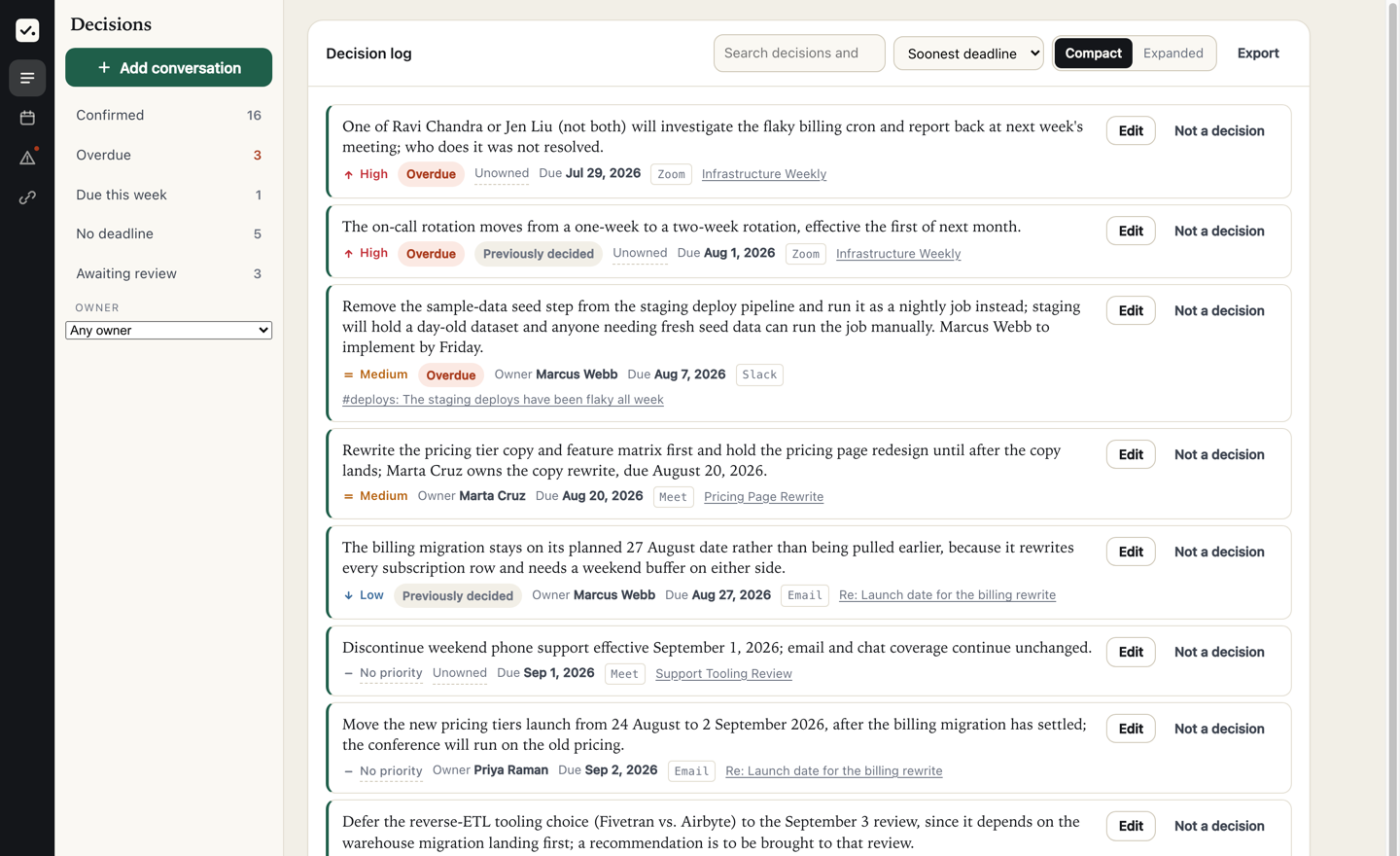
The Settld decision log. A list of decisions, each with a priority, an owner, a deadline and a badge naming where it was decided — Zoom, Slack, Meet and email. The rail on the left counts sixteen confirmed, three overdue and three awaiting review.
The log after a fortnight. Every row names the conversation it came out of, whichever tool that was.
The part that matters

It catches the reversal you didn’t notice.

Extracting decisions is table stakes. The value is knowing when a decision you already made stops being true — and telling the person who owns it.

Semantic, not keyword

“We’re going with Postgres” and “switch the notifications store to DynamoDB” share no words. Settld compares meaning, so a reversal phrased entirely differently still surfaces.

Tuned to catch, not to be quiet

A missed contradiction costs weeks. A false flag costs ten seconds. Settld errs toward showing you the pair and letting you dismiss it.

Never resolved automatically

A model deciding which of two decisions is “right” would be a liability. Settld surfaces the pair with both sources and a person chooses.

Reversed, superseded, or partly changed

A full replacement supersedes the original and links back to it. A partial change is recorded as a resolved conflict with a note, so the original still reads as the decision it was.

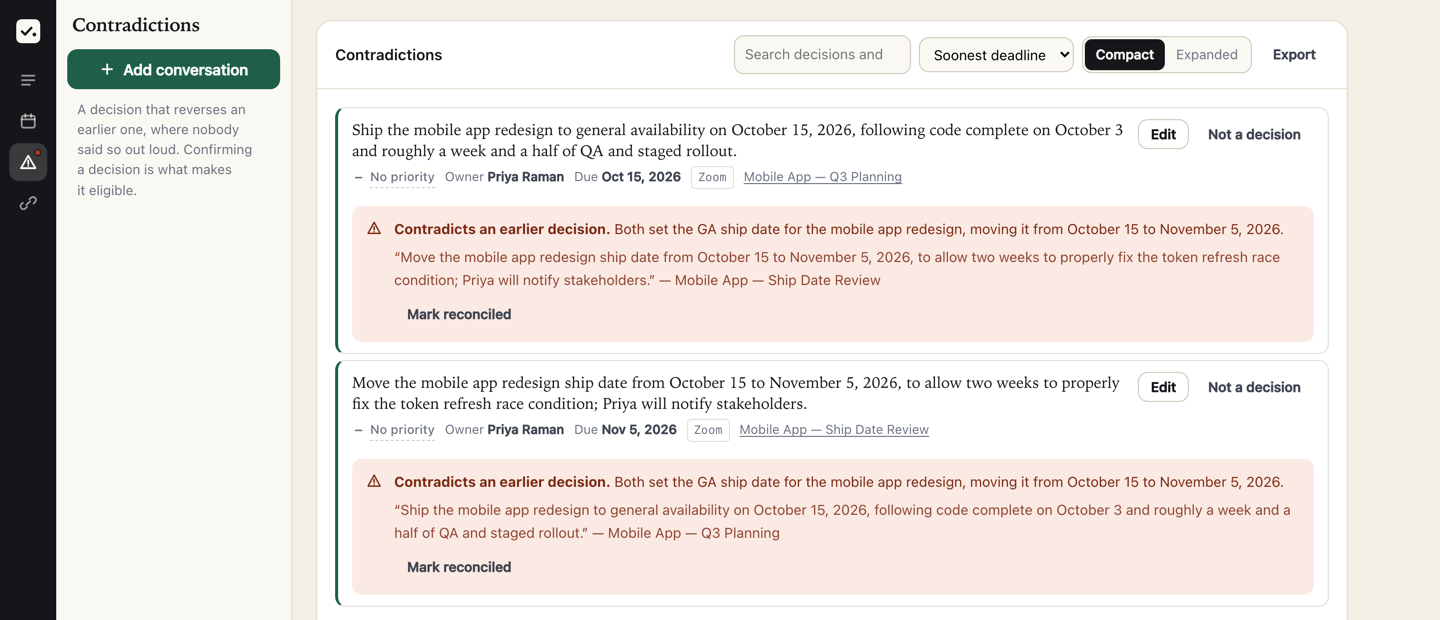
The Contradictions view. Two decisions about the same mobile app ship date sit one above the other, each carrying a red panel that names the contradiction and quotes the other decision in full. Under each is a Mark reconciled button.
Both halves of a reversal, each quoting the other. “Mark reconciled” is a person’s click — Settld never picks a winner.
What you get

A record you can point at.

Every decision cites its source

Each one links back to the message or the transcript line it came from. When someone disputes it, you open the line.

Owners and deadlines

Pulled only when someone actually accepted the work. No owner is recorded when nobody took it.

Confidence you can filter on

Hedged discussion scores low and routes to review. Confident extraction of ambiguity is the failure mode Settld avoids.

Weekly digest

One email: decisions past their deadline, decisions with nobody on the hook, and conflicts waiting for a human.

Search across every source

Filter by owner, project, status, or date. Find what was decided about billing in March without opening Slack, your inbox and six documents.

Sources

Wherever the decision actually got made.

No bot in your meeting, no browser extension, no third-party notetaker holding your recordings — and nothing reading a channel you didn’t point it at.

Meetings

Upload or connect

The transcript your platform already produces. Nothing new attends the call.

  • Zoom cloud recording transcripts — the timestamped, speaker-labelled .vtt
  • Zoom AI Companion summaries, whose “next steps” are used as hints and checked against the document
  • Google Meet transcripts and Gemini “Take notes for me” docs, exported or pasted

Slack

React to a thread

An app you invite to the channels you choose. React with ✅ and it reads that thread — and nothing else.

  • Public and private channels the app has been invited to
  • The thread you react to, not the conversation around it
  • A confirmation posted back, with a link to what was extracted

Email

Forward the chain

Your workspace gets its own address. Settld never connects to a mailbox and sees only what is sent to it.

  • Chains forwarded from Gmail, Outlook or Apple Mail
  • Quoted history stripped, so a chain forwarded twice isn’t counted twice
  • Only verified senders on your workspace can use the address

Microsoft Teams

Send to Settld

The … menu on any message. It reads the thread around that message, as you, and stops there.

  • Channel conversations, group chats and one-to-one chats
  • Read with your own permissions — not tenant-wide access
  • The thread around the message you actioned, and no further

For meetings, your workspace admin must have cloud recording and transcription enabled — Settld reads what those produce and can’t turn them on for you.

Security

Your conversations are sensitive. Treated that way.

Nothing is read unless a person sends it

Settld has no ambient access to anything. In Slack it is an app you invite to specific channels, and it reads a thread only when someone reacts to it. The email address receives only what is forwarded to it. In Teams it reads the thread around the message you actioned, with your permissions, and stops there. No channel, inbox or calendar is synced in the background.

No model training

What you send is processed to extract decisions and is never used to train models.

Tenant isolation in the database

Every row is filtered by your organisation at the database level, not by application convention. A query that forgets to scope returns nothing rather than someone else’s data.

Private storage, encrypted at rest

Uploads live in private object storage and are never served from a public URL. They’re fetched server-side after an ownership check.

Sign-in links, not passwords

Single-use, fifteen-minute links. Nothing to reuse, leak, or store.

Delete means delete

Removing a conversation removes its text, its decisions, and the stored file.

Pricing

Per person, with the month’s conversations pooled.

You pay for the people who send conversations in and keep the record straight. Reading it stays free for everyone else — a record half the organisation can’t see isn’t a record. The monthly allowance is shared across the workspace, so one person’s heavy week doesn’t block the rest of the team.

Free

$0

10 conversations, up to 3 people

Start free
  • Decision extraction with sources
  • Every source — calls, Slack, email, Teams
  • 90 days of history

Business

$24 / person / month

60 conversations per person, per month

Start free trial
  • Everything in Team
  • Audit export
  • Priority support

A conversation is one thing you sent: a meeting, a thread, a forwarded chain — a fifty-minute call and a six-message Slack thread each count as one. Allowances pool, so five people on Team share 100 a month however they fall between them.

Questions

Reasonable objections.

Does a bot join my meetings, or sit in my channels?

No. Settld never joins a call and never records anything — it works from the transcript your platform already produces. In Slack it is an app you invite to specific channels, and it reads a thread only when someone reacts to it. In Teams it reads the thread around the message you send it, using your own permissions rather than tenant-wide access. Nothing is listening in the background.

How is this different from an AI notetaker?

A notetaker summarises what was said, on the calls it was invited to. Settld extracts what was settled, wherever it was settled — and keeps it, so a decision made in July can be checked against one made in October. A summary has no memory across conversations; that memory is the entire point here.

What if it extracts something that isn’t a decision?

Nothing reaches your record without a human accepting it. Every extraction lands in a review queue with its confidence score and the line it came from. Hedged discussion scores low precisely so it surfaces for a person rather than being asserted.

What happens to what I send it?

It’s stored in private object storage, encrypted at rest, isolated per organisation at the database level, and never used to train models. Deleting a conversation deletes its text, its decisions, and the stored file.

What about a thread that decided nothing?

It will tell you so. A status update, or a thread that argues and settles nothing, returns an empty result rather than inventing something to justify the trip. The empty case is tested explicitly.

What about decisions made before we started using this?

When a conversation confirms something settled earlier — “that’s decided, two weeks instead of one” — Settld records it and marks it as previously decided, so the date it entered the record isn’t mistaken for the date it was made.

Stop having the same argument twice.

Send it one thread or one transcript and see what your team actually decided last week. Takes about a minute.

Start free